Showing posts with label FamilySearch betas. Show all posts

04 October 2013

Introducing the New FamilySearch Indexing Tool, RootsTech 2014 preview

I've decided to write a few previews of stuff we will all learn about at RootsTech 2014. Earlier, I wrote about FamilySearch Obituaries. Another product coming next year at FamilySearch is an overhaul of the indexing tool, listed in the class schedule as: "Introducing the New FamilySearch Indexing Tool."

This is another one of my top pics for RootsTech 2014 classes to attend.
The RootsTech 2014 class list states: "Scott Flinders, the product manager responsible for FamilySearch indexing, will provide an overview and demonstration of the new, browser-based indexing tool being developed by FamilySearch."

Today (October 4, 2013), FamilySearch gave a presentation to Stake Indexing Directors which was available for viewing online. I've captured some screens and facts to provide you with this preview. If you don't want to know about this until RootsTech, I suggest you stop reading this.

As advertised before, the new system will be entirely browser-based so that downloading software is no longer required. Most of the basic workings of the system are still there, but everything has been enhanced in accordance with user feedback.

One of the first changes you'll notice, you will be able to use powerful filters and waypoint data to find a specific project to work on. You will be able to choose a specific town, county, or parish to work on, Flinders said.
The view of the actual work process provides all the tools we have come to know and love: Highlights, Lookup, International Characters, Handwriting Examples etc. Flinders pointed out that the traditional data entry modes are still there (table and form), and that two more are available. He said one was for indexers who like to index by column although I do not know how it differs from table mode. The 2nd new mode is "in-line" which will have you type the data in a box right where you see it on the screen, and move from one area to the next as you go. I'd like to try that.

The next thing I noted was Flinder's statement that "In addition to..." the current A/B/Arbitrate workflow, there will be a new A + Review workflow. At first I thought they were just doing a terminology change from arbitrator to reviewer, but it turns out that the new process will be entirely different. The reviewer will not compare 2 indexers' work, but will simply review the work of one indexer. Flinders stated that they believe the index quality will remain the same, and the output will rise 40-50%. Regarding the "in addition to" statement, he later clarified that the old system will be maintained and in use until they are able to migrate all users and stats to the new system. If the A + Review is successful, I think they will stop A/B/Arb when they close the old system, though this was not clear to me. This was perhaps the most exciting news to me because it means 40-50% more records for all of us! I would like to know what selecting "don't know" will do. For that matter, I'd like to know what happens if a reviewer says a data piece is wrong. It seems logical that wrong data be corrected by the reviewer, and "don't know" data get sent up the line to a more experienced reviewer, though nothing was said about that detail.

FamilySearch Indexing Groups are a major step forward as well. These groups come with better statistics reporting for group managers, group goals to motivate all users, an increased sense of "social media," among several other interesting features.
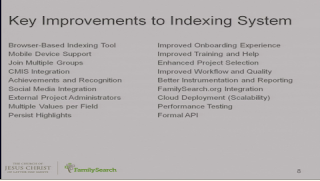


The list of improvements is impressive, although I must admit there are a couple which are over my head.

Further down, I've posted the slides that show the timetable for release.


And another thing is the new way to add indexing projects. Instead of requiring FamilySearch employees to add every new indexing project, specific volunteers can be approved to do this within the same website. Flinders mentioned that this will allow archives and other record custodians more control over adding their projects to the system, although I imagine FamilySearch will still require the images to be digitized and ingested according to their guidelines.


Phew! A lot of interesting facts and screenshots today. Come to think of it, I bet they'll be a lot more to learn by the time we get to RootsTech in February.

FamilySearch Obituaries, RootsTech 2014 preview

At the beginning of September, I looked at the list of RootsTech 2014 classes and found one about "FamilySearch Obituaries"

This is what it says: "Everyone deserves to be remembered forever, for free. FamilySearch Obituaries allows everyone in the world to publish and share the obituaries of their friends. They also allow everyone to be a part of the grieving and memorial experience."

I noticed some days or weeks before, when you upload a story @ https://familysearch.org/photos/stories, that has some identifying word like "obituary" that the story was now being referred to as an obituary. See the screen capture below from one obituary I pasted into the system. Notice the words: "Edit Obituary." The system typically says "Edit Story" in that same spot. The system is recognizing certain stories as obituaries and categorizing them as such.

Categorization seems like a good idea, but it must just be a sign of even more features to come. I imagine that a future feature will be to choose the story type manually. Maybe someday another story type beside obituary will be defined. I also imagined that there would be some ability to sort, search, or put in order stories according to category.

We know that categorizing photos will be a thing. Tim Cross, manager of Photos and Stories has confirmed that photos will be able to be categorized as either person photos or documents. This will change minor things about the experience. He said, documents will be tagged with rectangles instead of the circles used for persons. In addition, photos already uploaded will be able to be categorized as documents in the future. Tim said not to wait, but to upload them now.

Tim Cross will be teaching the class being held at RootsTech, about FamilySearch Obituaries. I presume that he will explain, in detail, his vision for this new stories category. I am always very interested in FamilySearch products that are under development. Unless this class conflicts with another I need to attend, I will be giving you a report afterward.

You do not need to wait until RootsTech 2014, but can see the landing page for FamilySearch Obituaries today at https://familysearch.org/obituaries


Sometimes typing key words after http://familysearch.org/, in your browser, will take you to pages that are being developed. That is how I found this one.

08 July 2013

Big FamilySearch Announcements at RootsTech 2014 (my speculations)

RootsTech is where the new genealogy technology is revealed.

[Updates inside brackets, and some lists re-arranged to show completed items in chronological order]

Like any good genealogy technology enthusiast might, I have come up with ideas about what the future could bring. I know some serious gentechies will doubt my authority to make such statements, so let me tell you up front that this post is 99% opinion. No authority has been assumed. You might want to read it though, because it is 1% truth.

Why would I know anything worth reading on this topic? I've been at the last 2 RootsTechs, and watched the prior one online. I also make a hobby out of finding out what is coming at FamilySearch. I read their blog, their feedback pages--employees drop details about what is coming--, other blogs, talk to employees, and participate in numerous other ways to be sure that I am as well informed as possible. FamilySearch deliberately does not give a lot of advance detail about some of their projects, so staying informed of what they are working on takes some real effort. I will be happy to reveal my sources for any point you ask for more detail on.

The "Big FamilySearch Announcements at RootsTech 2014" title is just used here as an eye catcher. Deadlines are rarely given for the projects listed below and may appear before or after RootsTech. Now that we're done with that disclaimer, on to the list.

PS. If you want more explanation [or my source] about a topic please ask nicely in a comment. I'll be happy to respond to comments in future posts. There is a lot more I could say about any of the given bullet points.

Family Tree
  • Generate a pre-filled search form by going to search from a person page on the tree [added ~7/19/13]
  • Attach FamilySearch historical records directly to the tree without having to go to the source box [added ~7/24/13]
  • Selectively share living people on the tree with private groups
  • Attach a source like a census to everyone in the household all at once
  • Use cell-phone texting to interact with Family Tree (especially for countries with poor Internet)
  • Full media-included data transfers across platforms (e.g. Ancestry.com, FindMyPast)
  • [See a list of most likely historic record matches from inside a person page]
  • [Show photos on family tree view]
  • [Attach uploaded images/files to sources]
Photos/Stories/Media
  • Audio interview and/or photos app
  • Use of the FHC printers to upload photos directly to FamilySearch.org
  • New photo viewer with zoom capability
  • Link multiple photos together (such as in multi-page documents)
Indexing
  • Browser-based indexing 
  • Index corrections
  • Handwriting recognition, being studied
  • FamilySearch Linking beta comes of age 
  • [Indexing API so 3rd parties can create indexing apps (e.g. phone, Facebook, tablets)]
  • [Indexing projects can be made by societies and eventually individuals (e.g. family bible page)]
Books
  • Specific page results
  • Better user interface
Genealogies
  • Provide link or searching of Community Trees
Catalog
  • Finish listing all Family History Center collections
  • WorldCat will finish listing all FHLC collections
Historical Records
  • Collection-specific search fields (census, vitals first) [added ~7/29/13]
  • Volunteer project to list records at various archives
  • Expansion of US Public Records Index
  • More Italian and Latin American indexing
  • Ability to merge record text into the Family Tree during attach process
  • Notable progress on Ancestry.com-FamilySearch USA probate project
  • [Some of the following: Family Photo Albums, Information on Origin of Surname, Oral Records, Yearbooks, Newspapers]
User Interface, Help, and Social
  • Improved home page, easier navigation
  • FamilySearch Groups and other social media
  • Integrated help
  • [New LDS features to help church members integrate better with the ward and their own families]
Can you help me add to this list with things you know are being worked on?

I did a much more detailed list in January 2013: RootsTech 2013: What might FamilySearch reveal?
Some projects are in development for years, and some die out before ever going public. For example, it is still not clear what happened to the Kinfolio project. FamilySearch Labs only ever lists a very small fraction of ongoing projects.

01 July 2013

FamilySearch Groups, child of FamilySearch Forums


On November 18, 2009 FamilySearch introduced FamilySearch Forums to consultants and center directors (volunteers at any of the 4,600+ Family History Centers). Thanks to Renee of Renee's Genealogy Blog for posting the announcement. Click through to read it.

Even though message boards and forums have been around since the early days of the Internet, at the time, I think this was somewhat of a new thing for FamilySearch. The forum web software that was used on FamilySearch was not top-of-the-line by any means. As often happens with discontinued features, there are people who miss the forums. In my view, they never were as good as existing forums on sites like Ancestry.com and RootsWeb. They never did quite catch on, so the community and content value was lower. FamilySearch felt they were not good enough to promote with high visibility and that a better 3rd party format was needed. I believe the forums were never officially taken out of beta.

Since 2009, FamilySearch has started more than 100 research help Facebook pages. These were built in 2011 and 2012. FamilySearch sees a need in the community to provide ways for people to communicate in real-time online. FamilySearch Skype research groups was a short lived project that ran through 2012. Other platforms have been tested internally to find out what methods are most helpful to the community.

The FamilySearch Forums were officially closed on December 31, 2012. Thanks to James Tanner of Genealogy's Star for posting the announcement. Click through to read it.

For my internship with FamilySearch, I actually got to help with the Facebook genealogy research pages. I felt that it was better than the forums because it allowed more social interaction, notification options, a cleaner/brighter look, easier to invite others to get involved etc. One of the biggest downsides of Facebook is that you cannot search the text of wall posts, and that can be important when you are looking for an old question or answer.

FamilySearch Groups has brought together the best of both worlds. Built on the social enterprise platform known as Yammer, FamilySearch Groups feel a lot like using a Facebook wall with the addition of important features like searching all posts.

Update: Sorry for the bad link to FamilySearch Groups. I took it down. You must be added by someone who is already in FamilySearch Groups. FamilySearch has made an official request form for those who want to join. Click here to fill it out.

Although it is in its early infancy, Groups is available to the public. Official invitations are scarce because FamilySearch recognizes that much more should be done before creating large influxes of traffic. If you are into testing new things or social media, you should to join right away. You'll need a new account because it runs on a 3rd party framework called Yammer.

When people see the site for the first time they often wonder how to keep track of posts in the new environment and how it can benefit them. Perhaps that will be the subject of future posts.

16 April 2013

FamilySearch Press Release: New version of website


April 16, 2013
Press Release

FOR IMMEDIATE RELEASE
16 April 2013

New Online Tools Help Preserve and Share Precious Family Photos and Memories

Features create connections and bring family stories to life
FamilySearch New Features Media Kit
Training Videos


  • Searching Records
  • Family Tree
  • Photos and Stories
  • SALT LAKE CITY - FamilySearch International, a nonprofit, volunteer-driven genealogy organization, announced the release of significant new enhancements to its web services that allow visitors to collaboratively build their family tree online, preserve and share precious family photos and stories, and receive personal research assistance-all for free. Find out more at FamilySearch.org.
    "Every person who has ever lived has a right to be remembered and is a story waiting to be told," said Dennis C. Brimhall, CEO for FamilySearch. "Every family is a story in progress." Brimhall explained that the new FamilySearch.org features help move family history beyond research to appeal to a larger audience of people who are very interested in their family's stories, but who don't consider themselves genealogists or researchers. "We all treasure memorable family photos and ancestral stories that inspire, amuse, or connect us. Families can now share and preserve for posterity those social heirlooms that help vitalize their family history," Brimhall added.


    The enhancements include Family Tree, an online application where users begin by adding information about themselves and then start to add information about their ancestors to collaboratively build, manage, and share their family history. The tree is already populated with over 900 million records contributed by patrons. And there are billions of historic records that can be searched for free to help further expand your family tree.


    The Photos and Stories feature lets you preserve favorite family photos of ancestors and share them through social media. You can tag people in a photo to identify who they are and connect them to respective ancestor profiles in the Family Tree. The photos can then be easily shared with the online community. You can also upload your favorite stories about an ancestor to preserve them for future generations.


    Julie Lowe from Missouri is the proverbial photo archivist of her family. She has albums of ancestral photos. Between her and her siblings, they are also walking libraries of countless stories and memories of their parents, grandparents, aunts, uncles, some great-grandparents, and other ancestors. They will be using the Photos and Stories feature to begin preserving their favorite photos and stories for future generations. Each person can save and share up to 5,000 ancestral photos in Family Tree.


    "When a parent or grandparent takes the time to tell you a story, there's a bonding that occurs there," Brimhall said. "Likewise, a family photo and story preserved and shared in the context of one's family tree, in an instant, can personally touch us and teach us time-honored principles by those who have gone on before us, like the value of hard work, dealing with life's ups and downs, and the impact of choices."


    Other features added include the interactive Fan Chart, a tool used by millions to create a colorful fan chart of their ancestry; the Family Tree Wizard, a tool that asks questions to help you begin to build your personal family tree and get you started; and Live Help, a global online community that provides free product help and personal research assistance by phone and web chat 24 hours a day/7 days a week. The help website and services are available in 10 languages.

    About FamilySearch International
    FamilySearch is the largest genealogy organization in the world. FamilySearch is a nonprofit, volunteer-driven organization sponsored by The Church of Jesus Christ of Latter-day Saints. Millions of people use FamilySearch records, resources, and services to learn more about their family history. To help in this great pursuit, FamilySearch and its predecessors have been actively gathering, preserving, and sharing genealogical records worldwide for over 100 years. Patrons may access FamilySearch services and resources for free at FamilySearch.org or through more than 4,600 family history centers in 132 countries, including the main Family History Library in Salt Lake City, Utah.

    16 February 2013

    More FamilySearch website prototypes (with screenshots)

     A couple weeks ago I posted about the FamilySearch website design in the works. It is still in very early stages and changes often. The final product that a user sees may be very different, but I've kept screenshots for those interested in the development of the new look.

    All of these redesigns are a parts of projects to make the site more user friendly, attract new users, and I've noticed they are more friendly to mobile devices. While this is interesting, it may be a long time before we see any of this--if we do see it released.

    I first became aware of this kind of look during the Kinfolio beta and designing of early last year:

    FamilySearch Photos (LDS beta) uses roughly the same kind of look (which is also the same look that is being tested for a new home page design):

    Here are some screenshots of the new home page design as they have evolved over the last two weeks. I have seen 3 new designs in this time.

     The next design:

    Here is the latest version: